
Last reviewed: November 2026
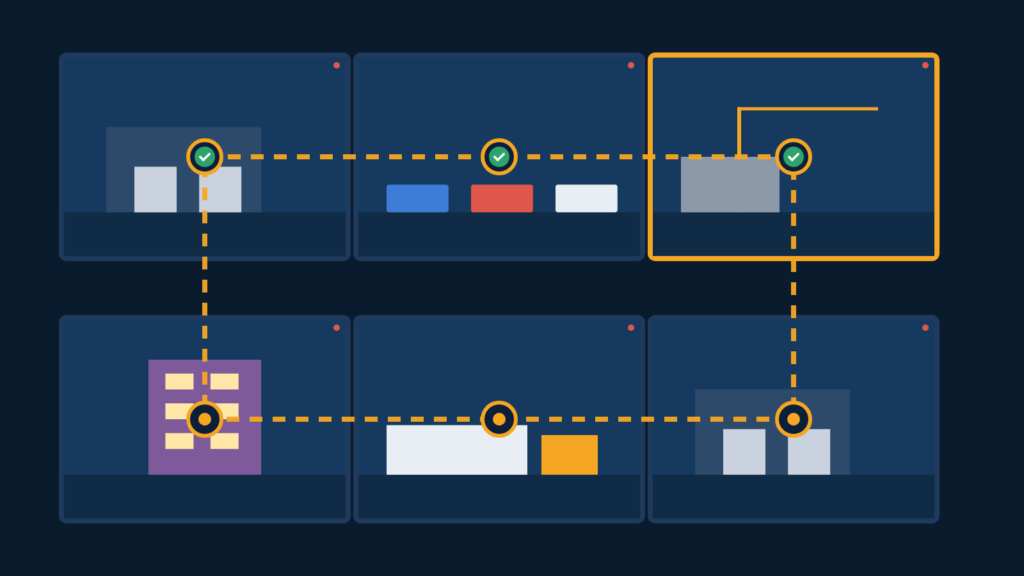
Quick answer: A virtual guard tour is a scheduled remote patrol in which a trained operator checks a site camera by camera, looking at gates, doors, fence lines, equipment and people, then logs what they find. It works like a guard’s walking round without anyone on site, and it catches quiet problems, like an unlocked gate, that motion alerts may never flag.
Key takeaways
- A virtual guard tour is a planned, camera-by-camera check of a site by a remote operator, run on a set schedule.
- Tours catch quiet problems, such as an open gate or a dark light, that may never trigger a motion alert.
- A good tour follows a written route and checklist, and every tour is logged with the time, findings and actions.
- Tours depend on camera coverage, clear night images and a reliable internet connection.
- Virtual tours complement, rather than fully replace, people on site for tasks that need hands-on action.
What is a virtual guard tour?
A virtual guard tour is a remote patrol in which an operator views a site’s cameras in a set order and checks each area against a checklist. It borrows the idea of a security guard’s round. The U.S. Bureau of Labor Statistics describes security guards’ work as including patrolling property, monitoring alarms and video surveillance systems, and writing reports on what they observe. A virtual tour brings those tasks together from a remote monitoring center.
The main difference from ordinary live monitoring is the trigger. Event-based monitoring reacts when a sensor or video analytics flags movement. A tour happens because the schedule says it is time, whether or not anything moved.
How does a virtual guard tour work, step by step?
A virtual guard tour works by following a planned route through the cameras, comparing what the operator sees with what should be there, and recording the result. A typical tour looks like this:
- Plan the route. The site owner and monitoring team agree which cameras to check, in what order, and what “normal” looks like in each view.
- Start on schedule. At the set time, the operator opens the first camera on the route.
- Check each view. The operator looks at gates, doors, fence lines, lighting, vehicles, equipment and any people present.
- Compare with site rules. Should the gate be locked after 7 p.m.? Is anyone expected in the yard tonight?
- Act if needed. If something is wrong, the operator follows the written response plan, which may mean a voice-down warning, a call to a site contact or a call to police.
- Log the tour. The operator records the time, the cameras checked, what was found and what was done.
On a well-run tour, “all clear” is still a result worth recording. It shows the site was checked, not just assumed to be fine.
What do operators check during a remote patrol?
Operators check the same things a guard would check on a walking round, as long as a camera can see them. A practical checklist usually includes:
- Gates and fence lines: closed, locked and intact, with no cut sections or gaps.
- Doors and loading docks: shut and secured, including roll-up doors.
- Lighting: working in the areas the cameras depend on at night.
- Equipment, vehicles and materials: present and where they should be.
- People: anyone on site, and whether they are expected.
- Hazards: visible smoke, flooding or storm damage.
- The cameras themselves: views that are blocked, moved, dirty or offline.
The last item matters more than it seems. A scheduled tour is often the first time anyone notices that a camera has been knocked out of position or has gone dark.
How often should virtual guard tours run?
Tour frequency should match your site’s risk and how quickly an unnoticed problem would cause harm. There is no single right number, but these questions help:
- When is the site empty? Tours matter most during closed hours.
- When are the risky moments? The hour after closing, shift changes and the early morning are common times to check.
- How large is the site? More cameras mean longer tours.
- What would a missed problem cost? An open gate at an equipment yard is a bigger risk than a light left on in an office.
Many sites combine scheduled tours with event-based alerts, so cameras are covered both by the clock and by motion detection. Review the schedule after a few weeks and use the tour logs to see where problems actually turn up.
How do virtual guard tours compare with other patrol options?
Virtual tours, physical patrols and event-based monitoring each do a different job, and many sites use a mix. This comparison is general; the right choice depends on your site.
| Option | Strengths | Limits |
|---|---|---|
| Virtual guard tour | Checks every camera view on a schedule; each tour is logged; no travel time between areas. | Limited to what cameras can see; cannot physically lock a gate or move anything. |
| On-site or mobile guard patrol | Can open, close and touch things; can check areas without cameras; visible presence. | Covers one area at a time; gaps between rounds; staffing long hours can be costly. |
| Event-based live monitoring | Responds when analytics flag movement; operator can warn and escalate. | Quiet problems with no movement, like an unlocked door, may not trigger an alert. |
If something needs a physical fix, such as relocking a gate, a virtual tour can only notify the right person. That is why tours work best with a clear plan for who goes to site and when.
What should a guard tour report include?
A guard tour report should show when the tour happened, what was checked, what was found and what action followed. Useful fields include:
- Date and start and end time of each tour.
- Operator identifier.
- Cameras or zones checked, plus any that were offline or blocked.
- Findings, including “all clear” entries.
- Actions taken, such as a warning given or a contact called, with times.
- Video clips or snapshots of anything unusual.
Over time, these logs reveal patterns, like a gate left open every Friday, that you can fix with a process change rather than more monitoring.
What does a site need for virtual guard tours?
A site needs cameras that cover the areas you care about, clear images at night, a steady internet connection and a written response plan. Before a tour schedule starts, list what each camera can and cannot see, then fix blind spots and poor lighting first; an operator cannot check what the camera does not show. An on-site speaker adds the option of a live voice warning.
Standards bodies have also addressed remote video services. In 2016, UL announced the first certification under UL 827B, which covers managed video service providers whose staff view video streams, make decisions and interact with people or systems at protected sites. If certifications matter to you, ask any provider directly what they hold and request documentation.
Where does Strixon fit?
Strixon is a remote video monitoring company. Trained operators verify alerts on your cameras, can give voice-down warnings through on-site speakers, and can call police and your contacts according to a written response plan. You receive time-stamped incident reports with video clips. See our remote guarding services to see what is available for your site.
Monitoring cannot prevent every incident, and no one controls how fast police arrive. For more context, read why verified alarms change how police respond or our 7-step plan for stopping construction site theft at night.
Frequently asked questions about virtual guard tours
How is a virtual guard tour different from live video monitoring?
A tour is scheduled and checks every camera on a route, whether or not anything moved. Event-based live monitoring responds when a sensor or analytics flags activity. Many sites use both.
Can a virtual guard tour replace a security guard?
Sometimes, for observation tasks. It cannot handle jobs that need someone on site, such as locking a gate, checking areas without cameras or helping visitors. Decide based on what your site actually needs.
How long does a virtual guard tour take?
It depends on the number of cameras and how much each view needs to be checked. Sites with fewer cameras take less time. Ask any provider how they plan routes for your camera count.
Do virtual guard tours need special cameras?
Usually not. Tours typically use existing IP cameras that support remote access, but views must be clear, especially at night.
Try remote monitoring on your own cameras
Want trained eyes on your site? Start a free 14-day trial; many existing IP cameras can connect after a free compatibility check. Questions? Email contact@strixonwatch.com.
Sources
- U.S. Bureau of Labor Statistics: Security Guards and Gambling Surveillance Officers, Occupational Outlook Handbook, 2026.
- UL: UL Issues First Managed Video Monitoring Services Certification for Remote Guarding via Command and Control, 2016.